Azure Functions and Azure Logic Apps can solve many of the same automation and integration challenges. Both can respond to events, call APIs, transform data and coordinate downstream systems.
This overlap can make it difficult to choose between them.
The question is rarely:
Which service can perform the task?
In many scenarios, more than one can.
The more useful question is:
What are the practical implications of implementing the solution as code, as a workflow or as a combination of both?
A code-first design provides control, modularity, automated testing and detailed diagnostics. It also gives the development team greater responsibility for orchestration, failure handling and operational tooling.
A workflow-first design provides managed connectors, visible execution history and built-in process controls. However, large, monolithic workflows can become difficult to test, navigate and maintain.
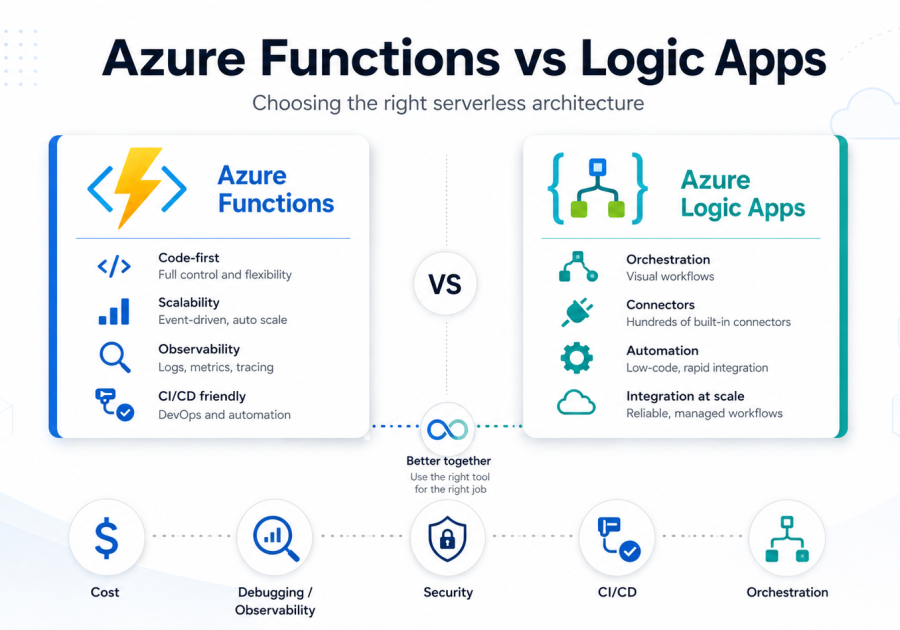
This article compares Azure Functions, Durable Functions and Azure Logic Apps across cost, observability, orchestration, security, networking and delivery practices. The goal is to help architects choose an implementation model their teams can sustainably build, operate and evolve.
Table of Contents
Start with the use case
Before comparing platform features, identify where the main complexity of the solution sits.
Code-centric use cases
Examples include:
- Processing Event Hub messages
- Applying pricing rules
- Validating documents
- Enriching telemetry
- Exposing custom APIs
In these scenarios, the primary challenge is usually the processing itself. This may involve algorithms, business rules, performance requirements, specialised libraries or complex data transformations.
Azure Functions are often the first option to evaluate because the implementation can be modular, independently tested and scaled.
When code must also coordinate a reliable, long-running process, Durable Functions may be appropriate. The runtime checkpoints progress and preserves orchestration state, while developers define the workflow in code.
Process-centric use cases
Examples include:
- Synchronising a CRM with an ERP
- Transferring files between SFTP and Azure Storage
- Managing invoice approvals
- Coordinating employee onboarding
In these scenarios, the primary challenge is usually system coordination, including connectivity, sequencing, retries, approvals and operational visibility.
Azure Logic Apps are often the first option to evaluate because workflows and connectors make these concerns explicit.
These categories identify the initial candidate, not the final answer. Latency, throughput, execution duration, availability, networking, connector support and team ownership may still influence the decision.
Understand the implementation models
he use case suggests where to start. The implementation model determines what delivery and operations teams must own throughout the solution’s lifetime.
Azure Functions: code-first processing
Azure Functions execute code in response to HTTP requests, messages, schedules and events.
Choosing Azure Functions gives the development team control over application code, dependencies, testing, error handling, telemetry, releases and performance.
Triggers and bindings simplify integration, but the team must still design, test and support the application’s behaviour.
Durable Functions: stateful orchestration in code
Durable Functions extend the Azure Functions model with reliable, stateful orchestration.
Developers define orchestrator and activity functions, while the runtime preserves execution state.
The team remains responsible for:
- Orchestration structure
- Activity boundaries
- Retries and compensation
- Versioning
- Supporting long-running instances
Orchestrator code must remain deterministic because the runtime may replay execution history to rebuild state.
Deployments must also account for instances that may remain active for hours or days.
Azure Logic Apps: declarative workflow and integration
Azure Logic Apps represent a process through triggers, actions, conditions, connectors and workflow state.
The platform manages much of the orchestration runtime. The solution team remains responsible for workflow structure, connectors, identities, retries, failure paths, deployment and governance.
This reduces the amount of custom orchestration code required and gives support teams direct visibility into process execution.
However, visual does not automatically mean simple. Large workflows, deeply nested conditions and duplicated logic can create maintenance and operational debt.
In summary:
- Azure Functions: The team owns focused application behaviour.
- Durable Functions: The team owns stateful orchestration expressed as code.
- Azure Logic Apps: The team owns workflow design and configuration, while the platform provides managed orchestration and process visibility.
Azure Logic Apps vs Azure Functions decision matrix
Use the following matrix to identify which trade-offs require deeper analysis. It should not be treated as a simple feature scorecard.
| Decision question | Azure Functions or Durable Functions | Azure Logic Apps |
|---|---|---|
| Is most of the complexity in custom processing? | Strong fit | Keep complex logic outside the workflow |
| Is most of the complexity in coordinating systems? | Requires more engineering | Strong fit |
| Is conventional unit testing central? | Strongest fit | Possible in Logic Apps Standard, but testing differs |
| Are managed connectors important? | Use bindings, SDKs or custom APIs | Strong fit |
| Do support teams need visual process history? | Requires telemetry and tooling | Built in |
| Is the orchestration highly technical? | Durable Functions may fit | May become visually complex |
| Is private networking mandatory? | Evaluate Flex Consumption, Premium or Dedicated | Logic Apps Standard is typically required |
| Does a wider workflow contain complex processing? | Use for focused processing | Use for coordination |
Compare the key decision factors
1. Cost model
Azure Logic Apps Consumption often has the lowest entry cost for small or intermittent workflows because there is no continuously allocated workflow capacity.
However, costs can rise with frequent executions, loops, polling triggers and managed connector calls.
Azure Logic Apps Standard has a fixed capacity baseline. It may offer poor value for one infrequent workflow, but it can become economical when several busy workflows share the same runtime.
Azure Functions Flex Consumption is Microsoft’s recommended serverless hosting option for new Function Apps and is often cost-effective for short, bursty processing.
Actual cost depends on factors such as:
- Execution volume
- Execution duration
- Memory consumption
- Always-ready instances
Azure Functions Premium maintains pre-warmed capacity and therefore has a higher baseline cost. It is suitable when latency, sustained performance or capacity requirements justify the additional expense.
App Service can be economical when spare capacity already exists, but inefficient when created solely for one small Function App.
To optimise cost:
- Replace polling with event-driven triggers.
- Reduce unnecessary workflow actions and loops.
- Keep Function executions short and memory-efficient.
- Share Logic Apps Standard or App Service capacity where practical.
- Model connector costs separately from workflow compute.
- Test costs against expected production volumes rather than development traffic.
The cheapest runtime is not always the cheapest overall solution. Include development, testing, connector licensing and operational support in the cost model.
2. Debugging and observability
Azure Functions integrate with Application Insights and distributed tracing. This allows developers to inspect exceptions, request paths, dependencies and application performance.
Azure Logic Apps provide a visual run history showing trigger inputs, action outputs, retries and failures. This helps support teams identify which stage of a process failed without needing to read application code.
The distinction becomes important when failures cross service boundaries.
A connector failure may require investigation in the destination platform, while a large workflow can generate noisy and difficult-to-navigate execution history.
Prefer Azure Functions when investigation depends on:
- Application code paths
- Dependencies
- Exceptions
- Distributed traces
- Performance diagnostics
Prefer Azure Logic Apps when the main operational requirement is identifying which process stage failed.
For hybrid solutions, propagate a shared correlation identifier through the Logic App, Azure Function and downstream systems. This makes it easier to trace one transaction across the complete process.

3. Orchestration complexity
Azure Logic Apps make conditions, retries, loops, delays and connector calls quick to compose and visible to operators.
The main risk is not scale itself. It is allowing one workflow to become too large.
Deep nesting, repeated patterns and complex inline transformations can make a visual workflow difficult to understand and maintain.
Before moving orchestration into Durable Functions, consider decomposing the solution into smaller Logic Apps with:
- Clear responsibilities
- Defined contracts
- Reusable components
- Shared error-handling patterns
Durable Functions are better suited when orchestration is highly technical, developer-owned and benefits from procedural code, sub-orchestrations and automated testing.
The trade-off is greater engineering responsibility for deterministic code, versioning, operational tooling and long-running instances.
Choose the orchestration model whose complexity the team can test, version and support over time, rather than simply choosing the interface developers initially prefer.

4. Security and networking
Security and networking requirements can eliminate a hosting option, even when its programming model appears to be the best fit.
For Azure Functions, private endpoints provide private inbound access, while virtual network integration enables outbound access to private services.
Flex Consumption, Premium and Dedicated plans support private networking, subject to plan-specific capabilities.
HTTP-triggered Azure Functions can use App Service Authentication with Microsoft Entra ID or other identity providers.
Function keys provide a basic form of access control, but they should not replace identity-based authentication.
Fine-grained authorisation can be implemented through:
- Claims
- Application code
- Azure API Management
Outbound access can use managed identity through application code or supported bindings.
Azure Logic Apps Standard also supports private endpoints for inbound access and virtual network integration for outbound traffic.
Azure Logic Apps Consumption does not provide the same direct, single-tenant networking model.
Request-triggered Logic Apps use SAS-protected callback URLs by default. Microsoft Entra OAuth can be configured for supported request-trigger scenarios.
Outbound authentication depends on the selected action or connector. Managed identity is available only where the relevant operation supports it.
It is important to distinguish between inbound and outbound connectivity:
- A private endpoint controls inbound access.
- Virtual network integration controls outbound connectivity.
One does not replace the other.
Connector type also matters.
In Azure Logic Apps Standard, built-in connectors run within the single-tenant runtime. Shared managed connectors use Microsoft-managed multitenant infrastructure.
This difference can affect:
- Network routing
- Authentication
- Performance
- Cost
- Compliance requirements
Before making a decision, map:
- Who invokes the endpoint and how they are authenticated
- Which identity accesses each downstream system
- Whether each connector supports managed identity
- Which private systems, firewalls, DNS services and supporting components are involved
- Whether shared connector infrastructure is acceptable
Choose the option that supports the complete identity and network path, rather than one that simply lists private networking or managed identity as a feature.
5. CI/CD and developer experience
Azure Functions follow a familiar software engineering lifecycle involving:
- Source control
- Package management
- Unit testing
- Pull requests
- Automated deployment
Azure Logic Apps Standard also supports local development, source control and CI/CD.
Its application files can be promoted separately from infrastructure, making it more suitable for disciplined, multi-environment delivery than the older template-oriented Logic Apps Consumption model.
A useful middle ground is hosting custom .NET code within a Logic Apps Standard project.
This approach can suit small processing steps that are tightly coupled to one workflow.
Use a separate Function App when the logic needs to be:
- Reused by multiple solutions
- Scaled independently
- Released separately
- Owned by another team
Choose the model that fits the team responsible for reviewing, deploying, troubleshooting and changing the solution throughout its lifetime.

No single factor determines the right choice. The following example shows how these trade-offs can combine in a realistic design.
Practical example: order processing
Consider an order that must be:
- Validated
- Priced
- Approved
- Recorded in an ERP and CRM
- Sent to a warehouse
- Confirmed to the customer
In a hybrid design, the Azure Logic App would:
- Receive and coordinate the order
- Manage the approval process
- Invoke downstream systems
- Retry transient integration failures
- Expose end-to-end process history
- Escalate unsuccessful orders
The Azure Function would:
- Calculate pricing and tax
- Apply eligibility rules
- Validate product combinations
- Perform complex transformations
- Return a structured processing result
The boundary between the services must also define failure ownership.
The Azure Function should return a clear, idempotent result so that repeated calls do not create inconsistent outcomes.
The Logic App should own process retries, compensation, escalation and downstream sequencing.
Durable Functions could also be appropriate if the organisation wants to implement the complete orchestration as code.
This would provide stronger code-level control, but the development team would also need to own versioning, operational tooling and the support experience.
The hybrid design keeps process changes separate from pricing and validation changes, while making retry and failure ownership explicit.

Conclusion: choose the model your team can sustain
Azure Functions, Durable Functions and Azure Logic Apps overlap enough that capability alone will rarely settle the decision.
The right choice depends on:
- The solution’s dominant complexity
- Its non-functional requirements
- The operating model of the team that will support it
Choose a code-first model when control over testability, processing logic and diagnostic depth justifies the additional engineering responsibility.
Choose a workflow-first model when managed integration, process visibility and built-in orchestration reduce more complexity than they introduce.
Choose a hybrid model when the boundary is explicit: custom code owns focused processing, the workflow owns coordination and both sides agree on identity, telemetry and failure behaviour.
The best architecture is not necessarily the one that reaches its first successful run the fastest.
It is the one that remains understandable, supportable and changeable as the solution evolves.
Do not choose the service that merely completes the workflow. Choose the implementation model your organisation can sustainably build, operate and evolve.