
Microsoft has released one of the most significant updates to Azure Virtual Desktop architecture in years: Azure Files now supports Entra ID–only authentication for SMB access (preview).
This means FSLogix profiles hosted in Azure Files no longer require:
- Active Directory Domain Controllers
- Azure AD Domain Services
- Hybrid identity
- NTLM/Kerberos authentication paths
This update unlocks true cloud-native AVD with zero Windows Servers.
Why This Matters
Historically, FSLogix demanded a domain-joined identity backend for SMB access. Even in cloud-first AVD deployments, organizations were forced to maintain either Active Directory Domain Services or rely on Storage Account Keys as a workaround. The root causes were straightforward:
- SMB authentication depended on Kerberos or NTLM
- Azure Files SMB only supported AD-backed identities
- Session hosts required domain credentials to authenticate
With this update, Azure Files can now authenticate SMB clients directly using Entra ID OAuth tokens—completely eliminating the need for legacy directory services.
For AVD architects, this changes everything.
What’s New
Azure Files now supports:
- Entra ID–based OAuth tokens for SMB
- RBAC-based permissioning
- No reliance on Kerberos or NTLM
- Entra ID Joined VM support for FSLogix
- Token-based access that aligns with Zero Trust principles
- Directory and file-level permissions configurable via the Azure Portal (no more icacls from domain-joined machines!)
This is the first time Microsoft officially supports FSLogix profiles on Azure Files without any AD.
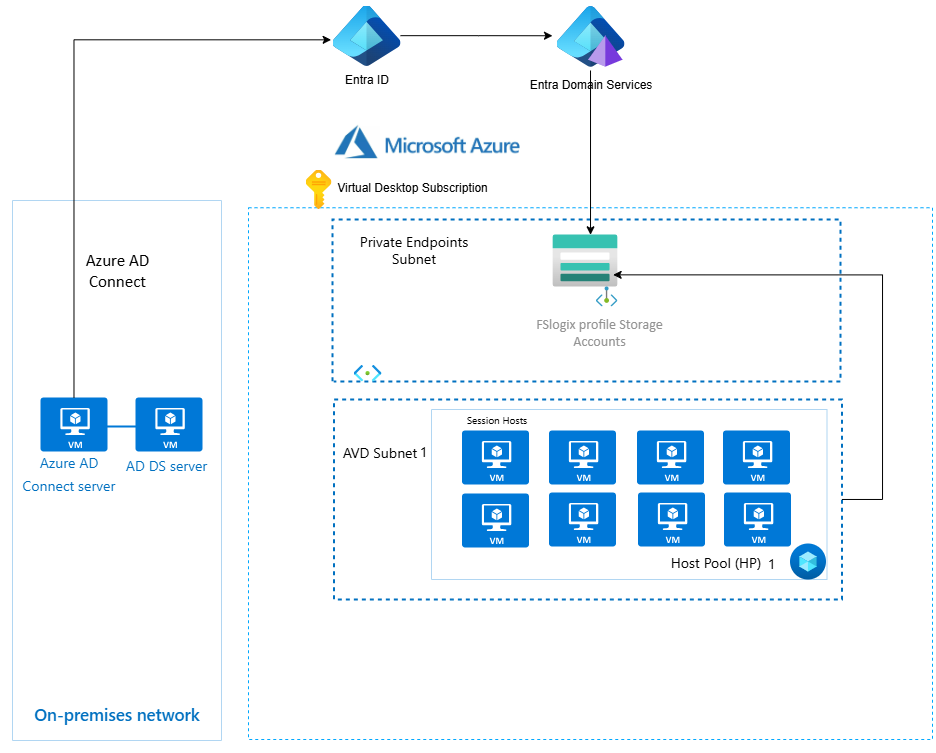
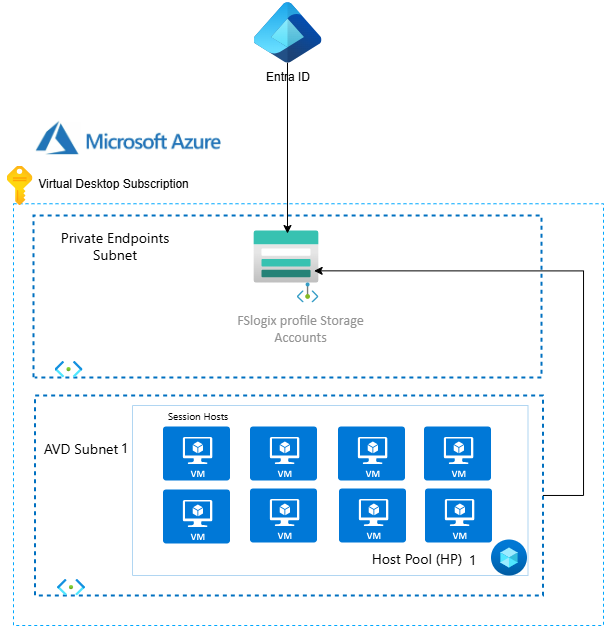
Architecture: Before vs After
🏢 Before: FSLogix on Azure Files (Traditional Model)
☁️ After: Cloud-Native FSLogix Using Entra ID Only (Preview)
Before You Begin: Prerequisites
For Cloud-Only Identities (Preview):
- Windows 11 Enterprise/Pro (single or multi-session)
- Windows Server 2025 with latest cumulative updates
- Clients must be Microsoft Entra joined (not hybrid joined or AD-only)
For Hybrid Identities:
- Windows 11 Enterprise/Pro (single or multi-session)
- Windows 10 Enterprise/Pro, version 2004 or later with KB5007253
- Windows Server 2022/2025 with latest cumulative updates
- AD DS with Microsoft Entra Connect or Entra Connect cloud sync
Important Considerations:
- You can only use one identity source per storage account
- MFA must be disabled for the storage account’s service principal
- The
WinHTTP Web Proxy Auto-Discovery Servicemust be running - The
IP Helper service (iphlpsvc)must be running
Configuration Guide
For the full step-by-step instructions, see the official Microsoft documentation:
- Enable Microsoft Entra Kerberos authentication
- Assign share-level permissions
- Configure directory and file-level permissions
🔍 Why This Is a Breakthrough for AVD
1. Removes AD Dependency
No more deploying and maintaining domain controllers or Azure AD Domain Services just for FSLogix. Your identity layer is fully managed by Microsoft Entra ID.
2. Enables Serverless AVD
Build complete AVD environments with zero Windows Server infrastructure. Session hosts, storage, and identity—all cloud-native PaaS/SaaS.
3. Simplifies Networking
Eliminate the need for site-to-site VPNs or ExpressRoute connections to on-premises AD. No more firewall rules for Kerberos/LDAP traffic.
4. Reduces Cost
- No domain controller VMs to run 24/7
- No Azure AD DS monthly fees (~$109+/month)
- Reduced networking costs
- Less operational overhead
5. Future Aligned (Zero Trust)
Token-based authentication with RBAC aligns perfectly with Zero Trust principles. No legacy protocols, no persistent credentials on the wire.
🌍 Regional Availability
Hybrid Identities: Available in Azure Public, Azure US Gov, and Azure China 21Vianet clouds.
Cloud-Only Identities (Preview): Currently available only in Azure Public cloud, limited to default share-level permissions for all authenticated identities.
📌 Preview Limitations
Before diving in, be aware of these current limitations:
| Limitation | Details |
| Windows Build Requirements | Cloud-only requires Windows 11 or Server 2025; hybrid needs Win10 2004+ or Server 2022+ with specific KBs |
| Single Identity Source | You can’t mix Entra Kerberos with AD DS or Entra Domain Services on the same storage account |
| MFA Exclusion Required | The storage account service principal must be excluded from MFA policies |
| Cloud-Only RBAC | Cloud-only identities can only use default share-level permissions (no per-user/group RBAC yet) |
| File Explorer Permissions | Configuring ACLs via Windows File Explorer isn’t supported for cloud-only identities |
| External Identity Limits | FSLogix on AVD is supported for external B2B users, but cross-cloud guests are not |
| Not Yet GA | This is still in preview—expect changes before general availability |
🧭 What This Means for FSLogix
This update fundamentally changes how you can architect FSLogix profile storage:
| Old Requirement | New Reality |
| AD DS domain controllers | ❌ Not required |
| Azure AD Domain Services | ❌ Not required |
| Hybrid domain join | ❌ Not required |
| On-premises network connectivity | ❌ Not required |
| Kerberos/NTLM protocols | ❌ Not required |
What Works Today:
- ✅ FSLogix profile containers on Azure Files
- ✅ MSIX App Attach from Azure Files
- ✅ Entra ID joined session hosts
- ✅ Cloud-only user accounts
- ✅ Azure Portal-based ACL management
Cross-Platform VDI Impact: While this announcement is most impactful for AVD, the underlying Azure Files capability benefits any VDI platform that supports Entra ID joined session hosts, including:
- Citrix DaaS (with Entra joined VDAs)
- VMware Horizon (with Entra joined desktops)
- Third-party VDI solutions
🔧 Troubleshooting
If you encounter issues, Microsoft provides a debugging cmdlet:
# Install the AzFilesHybrid module (v0.3.0+)
Install-Module -Name AzFilesHybrid
diagnosticsDebug-AzStorageAccountAuth -StorageAccountName "yourstorageaccount" -ResourceGroupName "yourRG"
This cmdlet performs basic checks on your Entra ID configuration and helps identify common misconfigurations.
Common Issues:
- Service principal password expired (for manual preview setups)
- MFA not properly excluded
- Missing admin consent on API permissions
- Client not configured for cloud Kerberos ticket retrieval
📣 Final Thoughts
This is the biggest identity improvement for AVD since Azure AD Join. For the first time, you can build a 100% cloud-native AVD environment without any Active Directory dependency.
The ability to configure directory and file-level permissions directly in the Azure Portal is a massive quality-of-life improvement—no more spinning up domain-joined jump boxes just to run icacls commands.
If you’re planning a greenfield AVD deployment or looking to modernize an existing environment, this preview is worth evaluating today.