TLDR
MAF’s pipeline is the reason to reach for it in production: security, retrieval, compaction, persistence, and telemetry each get their own layer, and none of them touch the agent’s core logic. After building an internal chat platform on it, the multi-agent features mattered far less to me than having somewhere sane to put all of that.
Introduction
I spent the last few months building an internal AI chat platform on .NET 10 and the Microsoft Agent Framework (MAF). Not a demo: streaming responses, per-user agents that non-developers configure themselves, file upload with RAG, tool calling, PII redaction, content safety, and the observability someone will inevitably ask for at 2am.
What follows is about the pipeline: middleware, context providers, compaction, storage, and telemetry, and what changed once each of those had a place to live.
What Microsoft Agent Framework changes
Microsoft Agent Framework is the merge of two Microsoft projects: Semantic Kernel (enterprise plumbing: state, telemetry, filters, type safety) and AutoGen (clean multi-agent abstractions). Microsoft’s own docs call it “the next generation of both,” built by the same teams, with migration guides from each.
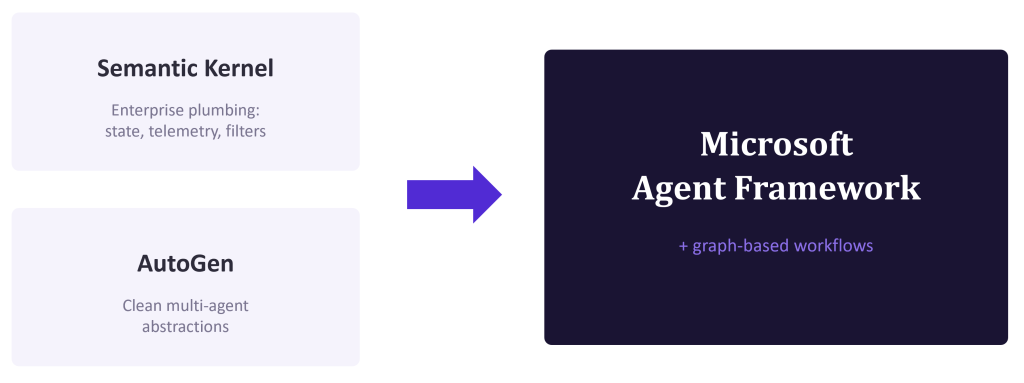
It’s the successor to SK, not a competitor. If you’re starting something new in .NET, this is the road. If you’re migrating an existing application, Microsoft’s Semantic Kernel migration guide is the place to start.
A unified agent abstraction
In Semantic Kernel, every agent needs a Kernel that combines services, plugins, and model connection. In MAF, an agent is an object built on an IChatClient from Microsoft.Extensions.AI:
					AIAgent agent = chatClient.AsAIAgent(new ChatClientAgentOptions
{
    Name = "policy-analyst",
    ChatOptions = new()
    {
        Instructions = instructions,
        Tools = tools,
    },
});
AIAgent is the base abstraction, and ChatClientAgent works with any provider exposing an IChatClient. Swapping providers become a service registration change rather than an architecture decision.
Because the agent has no conversation state baked in, we cache instances by configuration instead of rebuilding the object graph on every turn. The saved time is small besides a model call, but it removes unnecessary work from every request.
Why the pipeline is the actual product
MAF middleware lets you slot your own behaviour into different layers of the agent pipeline:
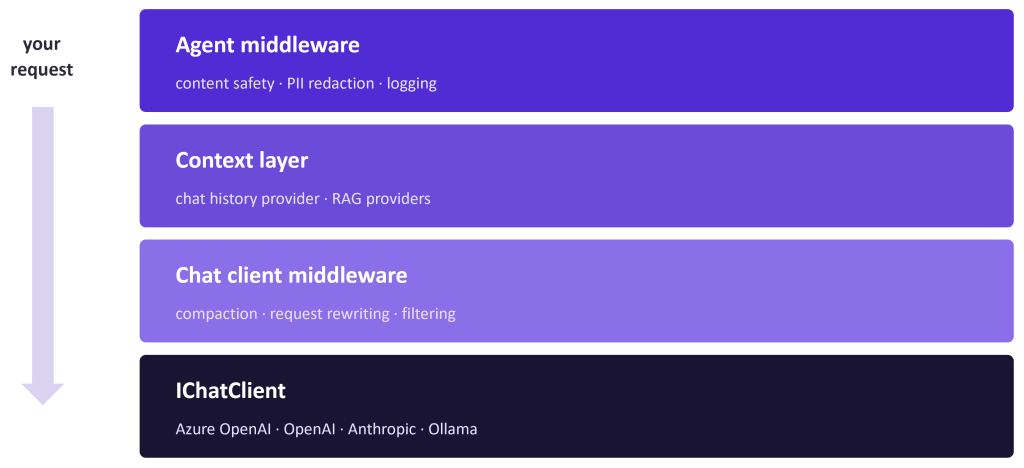
Each layer is a decorator you opt into with .Use(...). Our production agent is assembled roughly like this:
					var agent = chatClient
    .AsAIAgent(options)
    .AsBuilder()
    .Use(runFunc: contentSafety.Run, runStreamingFunc: contentSafety.RunStreaming)
    .Use(runFunc: redaction.Run,     runStreamingFunc: redaction.RunStreaming)
    .UseOpenTelemetry(sourceName: "my.agents")
    .Build();
Three cross-cutting concerns in this example (content safety, PII redaction and observability), none of them aware of the others or requiring a line of change to the agent’s core logic. They apply to every request regardless of what the agent does. MAF made agent behaviour composable with a pattern .NET developers have had muscle memory for since 2016. “Add PII redaction” became a self-contained ticket instead of a refactor. If you’ve written ASP.NET Core middleware, you already know this shape.
Tools are just methods and you can wrap them
Registering a tool is one line, and the JSON schema is inferred from the method signature:
					["web_search"] = tools =>
    AIFunctionFactory.Create(tools.SearchWebAsync, name: "WebSearch")
No plugin class and no [KernelFunction] ceremony. The method’s signature and its description become the contract the model sees.
AIFunction can also be decorated. We wrapped all our tools once with a redaction function, then put telemetry outside it so tool output is scrubbed before anything logs it. One security control without duplicated tool code.
Retrieval is a layer
MAF puts RAG in context providers, which run before and after every invocation and can inject messages, instructions, or tools into the request. Most frameworks leave it as one more tool the model can call.
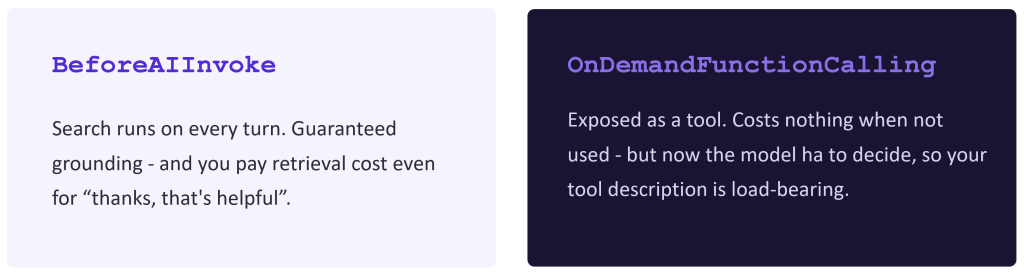
Retrieval also doesn’t have to be all-or-nothing. MAF’s TextSearchProvider can run eagerly on every turn, or expose itself as an on-demand function the model calls only when it decides it needs documents:
					new TextSearchProvider(searchAdapter, new TextSearchProviderOptions
{
    SearchTime = TextSearchProviderOptions.TextSearchBehavior.OnDemandFunctionCalling,
    FunctionToolName = "knowledgeSearch",
    RecentMessageMemoryLimit = 3,        // use recent turns to build the query
    ContextFormatter = FormatWithCitations,
});
RecentMessageMemoryLimit alone fixed a class of bug for us. Follow-up questions like “and what about the second one?” used to retrieve garbage, because the search query was built from that sentence alone. Letting the provider to see the last few turns made multi-turn retrieval work properly.
Compaction keeps long chats usable
Tool-heavy turns dump large results into history, while long conversations eventually exceed the context window. MAF addresses both with composable compaction strategies, applied cheapest-first:
					var pipeline = new PipelineCompactionStrategy(
    new ToolResultCompactionStrategy(CompactionTriggers.TokensExceed(4_096)),
    new SummarizationCompactionStrategy(summariserClient,
          CompactionTriggers.TokensExceed(16_384)),
    new SlidingWindowCompactionStrategy(CompactionTriggers.TurnsExceed(30)));
This collapses stale tool output first, summarises older history second, and drops old turns only as a backstop. MAF also treats a functionCall and its matching functionResult as one atomic group, avoiding invalid histories that the Responses API rejects.
Where you register compaction changes what it does. Register it on the chat client and it runs before every model call inside the tool-calling loop. Register it on the agent and it runs once, before history is stored, which means synthetic summaries can leak into your persisted conversation. We wanted the model to see a compacted view while Cosmos kept the real transcript, so: chat-client layer. One line and completely different semantics.
Production foundations
Bring your own storage, keep the loop
ChatHistoryProvider is an abstract class with two methods to override, load, and store. We back ours with Cosmos DB and stamp extra metadata onto each assistant message (token usage, which compaction stages fired, citation numbering).
So, we own persistence completely, and we own none of the tool-calling loops. That’s the trade I want from a framework.
Observability that isn’t an afterthought
One call on the chat client, one on the agent. MAF’s OpenTelemetry integration gives you spans following the OpenTelemetry GenAI semantic conventions, so tool calls nest inside model calls nest inside invoke_agent. It went straight into our existing Aspire dashboard and App Insights with no glue code.
.UseOpenTelemetry(sourceName: "my.agents", configure: c => c.EnableSensitiveData = false)
Sensitive data capture is a flag: off in production, on locally (when you need to see the actual prompts).
Where MAF still hurts
- Some good parts are still experimental. Compaction needs
#pragma warning disable MAAI001. You’ll collect a few of these. They’re stable enough to ship on, but the API can move. - Option merging has sharp corners. MAF merges the agent’s baked
ChatOptionswith per-run options, and that merges can dropChatOptions.Reasoning. We ended up writing a smallDelegatingChatClientthat re-stamps the resolved reasoning effort onto every outgoing request. Since the extension points are there, it’s solvable, but it costs a day to diagnose. - The docs are good, and the samples are catching up. Concept pages are strong; some of the deeper C# scenarios still point you at Python samples.
- Workflows are there when you need them. MAF’s graph-based workflows handle multi-agent orchestration with typed edges and checkpointing. We didn’t need them, as a single agent with good tools covered our use case. MAF’s own docs make the same call: “if you can write a function to do the job, do that instead of adding an agent”.
Conclusion: Should you move?
If you’re on Semantic Kernel, plan to move eventually, but budget for a refactor rather than a find-and-replace: the Kernel disappears, agent types consolidate, and plugins become plain methods. If you’re starting fresh in .NET, start with MAF.
Its advantage for a .NET team is integration. Agents register like other application services, configuration comes from IOptions, telemetry joins the same OpenTelemetry pipeline, and everything runs under Aspire locally. And the controls you build for security, context management, retrieval, and observability get reused instead of rebuilding inside every agent.
If your team is evaluating production agents on .NET, start by mapping your security, retrieval, storage, and telemetry requirements onto MAF’s pipeline layers. Then build one well-instrumented agent with good tools before reaching for a multi-agent workflow.