
TL;DR: Power Apps code apps are best used when you need a custom web frontend, modern engineering practices, and Power Platform services underneath. They do not replace canvas or model-driven apps, but they give organisations a strong third option when low-code patterns are no longer the right fit.
Table of Contents
Introduction
Power Apps code apps are one of the most important shifts in the Power Platform for pro developers. They allow teams to build custom web apps in Power Platform using a code-first development model, while still benefiting from Microsoft Entra authentication, connector access, managed hosting, and enterprise governance controls.
The shift from low-code to code-first power apps
For organisations that have outgrown the frontend flexibility of traditional low-code patterns, this is significant. It creates a stronger bridge between modern web development and the managed Power Platform operating model.
That matters because many teams eventually hit the same architectural ceiling. Canvas apps are fast and flexible, but they are not always the right fit for highly tailored user experiences or large-scale frontend engineering patterns. Model-driven apps are excellent for Dataverse-led processes but naturally opinionated in their UI model.
The moment a team needs a deeply tailored interface, stronger software engineering discipline, reusable component architecture, or a true single-page application, they often must step outside the platform. Code-first Power Apps applications change that conversation.
Rather than replacing low-code, code apps extend the platform into a new space. They give architects and delivery teams a third option: stay within Power Platform but build the frontend like a modern application.
What are Power Apps code apps?
Frontend vs Platform Responsibilities
A Power Apps code app is a single-page application built with HTML and JavaScript or TypeScript, then published into Power Platform and run through the Power Apps host.
Microsoft’s documented architecture includes four main elements:
- the Power Apps client library for code apps
- generated models and services for connectors
- the power.config.json file
- the Power Apps host
That structure matters because it clearly separates what the platform does from what your application does.
Your application owns the frontend. That includes the UI, layout, component structure, state management, client-side logic, and routing.
Power Platform provides the managed runtime envelope. That includes authentication, app loading, access to connectors through generated services, platform-based hosting and sharing, and enforcement of managed controls.
This is the key architectural shift. A code app is not just a canvas app with extra JavaScript. It is not a model-driven app with a prettier shell. It is a Power Platform code-first app running inside a managed platform experience.
Microsoft’s positioning is important here. Developers can build with frameworks such as React and Vue, develop locally, run the same app in Power Platform, and keep full control over UI and logic.
That means Power Platform is acting less like a UI designer and more like a managed application platform sitting underneath your app.
Canvas vs model-driven vs code apps
The easiest way to understand where code apps fit is to compare them against the two traditional Power Apps models.
App type | Best suited for | Strengths | Trade-offs | Choose it when |
Canvas apps | Internal forms, approvals, rapid business apps, lightweight line-of-business tools | Fast to build, flexible UI for low-code, strong for maker-led delivery | Large apps can become harder to structure and maintain | You need speed, low-code delivery, and a business-focused UX |
Model-driven apps | Dataverse-led enterprise apps, process-heavy business workflows, role-based experiences | Strong structure, built-in governance, security role alignment, standardised forms and views | Less flexibility for bespoke digital experiences | The data model and business process should shape the application |
Code apps | Custom web apps in Power Platform, highly tailored internal products, SPA-style enterprise experiences | Full frontend control, modern dev tooling, reusable component architecture, code-first engineering | Higher complexity, requires dev capability, some platform limitations still apply | You need a polished SPA frontend with Power Platform services and governance underneath |
Canvas apps are screen-first and formula-first. They are ideal when you want to build quickly, connect to data sources, shape the experience visually, and use Power Fx to handle logic.
Model-driven apps are data-first and process-first. They are strongest when the Dataverse model should drive the experience and the application benefits from standard forms, views, and role-based experiences.
Code apps are frontend-first. They are best when the shape of the solution should be driven by Power Apps SPA architecture, reusable frontend patterns, and software engineering discipline rather than by the standard maker experience.
How to choose the right app model
A simple way to think about it is this:
- choose model-driven when the data model should shape the app
- choose canvas when you need a fast low-code experience
- choose code apps when you need a custom SPA frontend with stronger engineering control
That framing is useful because it prevents code apps from being overused. They are not the “new best” app type. They are the right app type when the frontend and engineering model matter enough to justify them.
When code apps are the right choice
The right time to use a Power Apps code app is when a traditional low-code pattern starts to create real friction.
That friction usually appears in one or more of these areas:
- the UI needs to be highly tailored or heavily branded
- the interaction model is more complex than a typical business form
- the team wants structured frontend engineering, reuse, and maintainability
- the solution needs to fit a modern React or Vue development model
- the app still needs Power Platform connectors, Dataverse, and managed governance
Code apps are especially compelling when the requirement sounds more like “build us a polished internal product” than “build us a quick business app.”
Where code apps deliver the most value
For example, imagine a project approvals and delivery portal for a large enterprise. The solution may need:
- a branded dashboard
- custom search and filter behaviour
- multi-panel layouts
- rich navigation
- reusable approval widgets
- a timeline view
- custom validation and interaction patterns
- integration into Dataverse and other Power Platform-connected services
A canvas app could potentially deliver much of the business process. However, the user experience may start to feel constrained or harder to manage at scale.
A model-driven app could accelerate the data and process layer. However, it would not naturally support the kind of polished, application-like experience the business wants.
A code app becomes a strong fit because it allows the frontend to be built as a true single-page application while still sitting inside Power Platform’s service and governance model.
Alignment with modern development teams
Another strong scenario is where an organisation already has development teams that work with:
- Git-based branching
- npm package management
- frontend component libraries
- local development environments
- normal web application structure
That is where code-first Power Apps applications become especially attractive. They align more naturally to development teams already operating with software engineering discipline, rather than purely maker-led delivery patterns.
There is also a platform strategy benefit here. Code apps allow teams to keep using:
- Power Platform connectors
- Dataverse-backed data models
- Power Platform environment governance
- sharing and managed hosting
- enterprise policies such as DLP and Conditional Access
That avoids a binary decision between staying low-code and leaving the platform entirely.
When code apps are not the best answer
Code apps are usually not the best choice when the requirement is mostly:
- standard forms
- straightforward CRUD
- simple approval flows
- low-complexity internal tools
- rapid business-led delivery
- mobile-first access through the Power Apps mobile app
If the requirement is essentially a typical internal request form or a Dataverse-led operational application, canvas or model-driven may still be the better answer.
Code apps should be chosen because they solve a real architectural problem, not simply because they sound more advanced.
How Power Platform integration works in code
One of the most natural technical questions about code apps is this: what does the integration with the Power Platform backend actually look like in code?
That question matters, because otherwise a code app can start to sound like “just a JavaScript app hosted somewhere near Power Platform.”
In reality, Power Platform integration is a core part of the model. A code app uses the Power Apps client library together with generated connector models and services, which are created after you add and configure Power Platform connections.
That is how the frontend can call Dataverse or other Power Platform connectors from code while still running inside the Power Apps host.
So when you see a service call in a code app, it is not necessarily just an arbitrary local module. In a real implementation, that service layer is typically backed by generated connector models and services created from your Power Platform connection setup.
What data access looks like in practice
Conceptually, a service call might look something like this:
					// Example pattern only — actual generated names depend on your configured connection
import { getProjects } from "./generated/contosoProjects";

async function loadProjects() {
  const result = await getProjects({
    top: 20,
    status: "Active"
  });

  return result.value;
}
The key point is not the exact syntax. The key point is that Power Platform data access becomes part of a normal application codebase rather than living only inside formulas and control properties.
That is a major shift for teams used to Power Apps as a purely low-code experience.
It also changes how architects can think about application layering. Frontend components, services, hooks, and state management can now exist in a more standard structure, while the integration layer still participates in the broader Power Platform ecosystem.
Local development and developer experience
This is one of the most interesting parts of the code apps story: the development model is fundamentally different from traditional Power Apps.
You are not building directly in a browser-based designer. You are building locally as a developer, then pushing the finished compiled app into Power Platform.
That means the developer experience is much closer to a standard web application workflow. Teams can work in Visual Studio Code, use Node.js and npm, structure the app locally, and manage the project in a familiar engineering model.
Typical code apps development workflow
A typical flow includes:
- creating a project from a Vite template
- installing dependencies
- initialising the app as a Power Apps code app
- running a local development server
- building the app
- pushing it to Power Platform
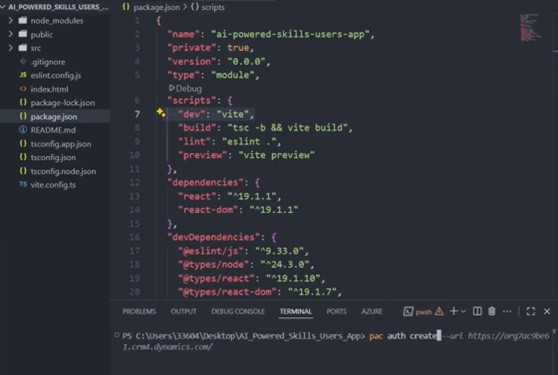
A simplified example looks like this:
					npx degit github:microsoft/PowerAppsCodeApps/templates/vite my-app
cd my-app
npm install
npx power-apps init --display-name "App From Scratch" --environment-id <Your environment ID>
npm run dev
npm run build
npx power-apps push
This opens the door to a more standard project structure, such as:
					src/
  pages/
  components/
  services/
  hooks/
  state/
  utils/
main.tsx
power.config.json
package.json
That structure is familiar to modern frontend teams and gives much clearer separation of concerns than many large low-code applications can achieve.
Pages stay separate from services. State logic stays separate from presentation. Reusable components stay modular. Frontend complexity becomes easier to organise and scale.
What local development likely means in practice
A common follow-up question is whether local development works by opening a Power Platform URL in the browser and pointing back to a local development server.
That appears directionally consistent with the way Microsoft describes local development behaviour, especially given Microsoft’s note that Chrome and Edge can block requests from public origins to local endpoints in some scenarios.
That said, unless Microsoft documents the exact runtime mechanism more explicitly, it is safer not to overstate the implementation detail. What is clear is that local development is local-first: you run the app locally, work in your normal frontend toolchain, and then publish it into Power Platform when ready.
That is already a major change from the traditional maker workflow.
Governance, security, and enterprise value
One of the strongest parts of the code apps story is that going code-first does not mean leaving governance behind.
That is what makes them particularly interested in enterprise Power Platform architecture.
A move toward fully custom web development normally means taking on more responsibility for hosting, governance integration, and operational control. Code apps reduce some of that gap by letting teams build a custom frontend while still participating in the Power Platform control plane.
That has a few practical implications.
First, DLP still matters. Just because the front end is custom does not mean the app is outside your Power Platform connector and data movement policies.
Second, identity and access still matter in familiar Power Platform ways. Conditional Access, sharing controls, and Azure B2B scenarios remain relevant.
This is where custom web apps in Power Platform become especially valuable. They allow teams to adopt stronger frontend engineering practices without abandoning the governance and security posture the platform already provides.
An important security design principle
There is one principle that should be called out clearly.
Teams adopting code apps should treat the frontend bundle the same way they would treat any other public web client.
That means:
- do not embed secrets
- do not hardcode sensitive datasets
- do not assume frontend obscurity equals security
- keep sensitive information in governed systems such as Dataverse or other secure backends
- retrieve data only after identity and authorisation checks
For pro developers, that guidance is familiar.
For some low-code teams moving into this model, it is an important mindset shift.

Current limitations and what they mean
Code apps are promising, but they are still evolving. That means solution design still needs to be deliberate.
Some limitations have a direct impact on architecture choices. For example:
- if your delivery model depends heavily on native Power Platform Git integration, you need to account for that
- if your users rely on the Power Apps mobile client, code apps may not be the right option
- if your use case is deeply tied to SharePoint forms customisation, code apps are not the answer
- if you expected traditional Power BI integration patterns, you may need to reassess how the app is surfaced
This does not make code apps weak. It simply means they should be used intentionally.
From an enterprise architecture perspective, the sensible approach is:
- Pilot deliberately
- Validate key assumptions early
- Watch the roadmap and documentation
- Avoid overcommitting before checking feature fit against your exact requirements
That is the right posture for any emerging capability, especially one that sits at the intersection of pro-code engineering and managed platform delivery.
Final thoughts
Power Apps code apps are one of the clearest signs that Microsoft is expanding the Power Platform beyond traditional maker scenarios and deeper into the world of professional application engineering.
They do not replace canvas apps. They do not replace model-driven apps.
What they do is give organisations a third route: build the frontend like a real modern web application, while still running inside the Power Platform ecosystem. That is a meaningful architectural change.
The real architectural value of code apps
The real value is not simply “more code.” The value is that teams can now combine:
- custom frontend design
- Local developer workflows
- modern framework-based architecture
- Power Platform connectors
- managed enterprise governance
in a single application model.
Used in the right place, that can be incredibly powerful.
Canvas apps remain the best choice for many rapid business solutions. Model-driven apps remain the best choice for many Dataverse-led enterprise processes.
But where the requirement calls for a polished, engineered, single-page application experience and the organisation still want to stay within Power Platform’s managed boundary, code apps become a very compelling option.
That is where they shine, and that is why they matter.
Want to go deeper on Power Platform architecture and modern application design?
Explore more of our technical insights or get in touch if you’d like to discuss how Power Apps code apps could fit into your environment.