In many Azure integrations, authentication is treated as a solved problem. An app hosted in Azure needs to call an API, so a service principal is created, a client secret is generated and the integration is ready to go. But as integrations and environments multiply, managing those secrets can quickly become an operational burden.
TL;DR
For Azure-hosted applications, managed identity removes the need to create, store and rotate client secrets while preserving Microsoft Entra ID app role-based authorisation. This article explains when to use managed identity, how to update application code and how to automate app role assignments through CI/CD.
The problem with client secrets at scale
Consider a common architecture you may have seen or implemented to secure your APIs:
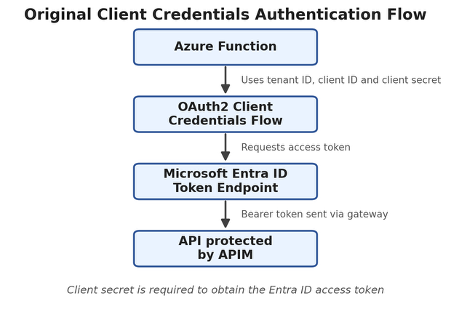
In this model, the application, such as a function app, authenticates using the OAuth 2.0 client credentials grant and requests an access token from Microsoft Entra ID before calling the API.
The function app here would require the following configuration values:
Tenant ID
Client ID
Client secret
API Audience
APIM Subscription Key
At first glance, this architecture appears secure and well understood. However, the operational burden grows over time as more integrations are built. Client secrets must be generated, securely stored, rotated and monitored throughout their lifecycle.
As environments grow, so does complexity. Development, test and production environments require separate credentials, configurations and governance controls. Add UAT, SIT, pre-production and multiple instances of each environment, and secret management can quickly become unmanageable.
As operational overhead increases, so do the consequences when something goes wrong, including:
Expired secrets breaking production integrations.
Incorrect configuration preventing token acquisition.
Secret rotation requiring coordination between multiple teams.
Configuration drift becoming increasingly difficult to manage.
The goal of this blog is simple: to explain how we can replace application-managed credentials with an Azure-managed identity while preserving the existing role-based security model.
When should you use managed identity?
Before diving into the implementation details, it’s worth understanding that managed identity is not a replacement for every application authentication scenario.
Use managed identity when
Managed identity is generally the preferred option when the calling application is hosted in Azure and only needs to access resources within the same tenant. Typical scenarios include:
Azure Functions calling internal APIs.
App Services accessing backend services.
Logic Apps invoking APIs.
Azure-hosted workloads accessing Key Vault, Storage accounts or other Azure services.
Applications where eliminating secret management is a priority.
In these scenarios, Azure can provide and manage the application’s identity automatically, removing the need to create, store and rotate client secrets. The application still obtains a Microsoft Entra ID token, but Azure manages the credentials behind the scenes.
Use client credentials when
Client credentials remain the appropriate choice when the calling application cannot use a managed identity. Common examples include:
Applications running outside Azure.
Third-party systems integrating with your API.
Applications running in another organisation’s tenant.
Cross-tenant integrations where a managed identity is not available.
In these scenarios, an application identity must still authenticate using a service principal and client credential because Azure is not hosting the workload and therefore cannot provide a managed identity.
For Azure-hosted workloads, managed identity removes the burden of managing secrets while preserving the same Microsoft Entra ID token issuance and app role-based authorisation model. The following architecture shows what that looks like in practice.
The target architecture
The objective of the migration is not to remove authentication. It is to remove the need for application-managed credentials. In the target state, the function app uses its managed identity to obtain an access token directly from Microsoft Entra ID.

The function app still acquires a Microsoft Entra ID access token and presents it when calling the API. The difference is that a client secret is no longer required. When a token is issued to the managed identity, the assigned app roles are included as claims within the JWT. The API can continue enforcing role-based access control exactly as it did previously.
What managed identity actually changes
Managed identities do not fundamentally change how API security works. The authorisation model remains largely unchanged.
The primary change is how the calling application obtains a token.
| Concern | Client credentials | Managed identity |
|---|---|---|
| Calling identity | App registration/service principal | Azure resource identity |
| Secret required | Yes | No |
| Token acquisition | Client ID and client secret | Azure Identity credential |
| Credential rotation | Application responsibility | Azure-managed |
| Deployment setup | Configure secret references | Enable identity and grant permissions |
| Authorisation | App roles | App roles |
| API changes | Usually none | Usually none |
Application code setup
At the application layer, the migration is intentionally small. The function app still requests an access token before calling the API. The difference is how that token is obtained.
Before: ClientSecretCredential
					var credential = new ClientSecretCredential(
    tenantId,
    clientId,
    clientSecret);

var token = await credential.GetTokenAsync(newTokenRequestContext([$"{audience}/.default"]),cancellationToken);
After: ManagedIdentityCredential
					var credential = new ManagedIdentityCredential();

var token = await credential.GetTokenAsync(
new TokenRequestContext([$"{audience}/.default"]),
cancellationToken);
For Azure-hosted workloads, ManagedIdentityCredential discovers the Function App’s Managed Identity and uses it to request a token from Microsoft Entra ID. When running locally, DefaultAzureCredential can be used instead to obtain developer credentials such as an authenticated Azure CLI session.
One important detail is that the requested scope remains unchanged:
api://<target-api-client-id>/.default
Managed Identity changes who can obtain the token, not which API the token is for. The Function App is still requesting a token for the target API, and the token will only contain the required role claims if the Managed Identity has been assigned the appropriate app role.
Automating app role assignments through CI/CD
One concern teams often have when adopting managed identities is how to manage app role assignments consistently across environments. Manually assigning roles through the Azure portal may work for a proof of concept, but it quickly becomes difficult to govern as environments scale. Development, test and production workloads all require consistent permissions, and manual configuration introduces the risk of configuration drift.
Fortunately, app role assignments can be automated as part of your CI/CD deployment process.
Treat permissions as code
When deploying infrastructure, we typically automate resource creation, configuration and application deployment. Identity permissions should be treated the same way.
A deployment pipeline can:
Locate the managed identity or Entra ID groups that require access.
Locate the target API’s service principal.
Discover the required app roles.
Assign one or more roles to managed identities and groups.
Validate whether assignments already exist to ensure deployments remain idempotent.
This approach ensures new environments receive the correct permissions automatically without requiring post-deployment portal configuration.
Below is an example template that can assign one or more app roles to managed identities and Entra ID groups as part of an automated deployment pipeline:
# Assign Entra ID app roles to managed identities and groups
parameters:
– name: serviceConnection
type: string
displayName: ‘Azure Service Connection’
– name: managedIdentityName
type: string
displayName: ‘Name of the Azure resource with the managed identity’
– name: managedIdentityResourceGroupName
type: string
displayName: ‘Resource group containing the managed identity resource’
– name: managedIdentityResourceType
type: string
default: ‘Microsoft.Web/sites’
displayName: ‘Resource type that owns the managed identity (system-assigned) or the UAMI resource itself’
# ‘Microsoft.Web/sites’ resolves the system-assigned identity on a Function App / Logic App
# ‘Microsoft.ManagedIdentity/userAssignedIdentities‘ resolves a stand-alone user-assigned identity
– name: targetServicePrincipalId
type: string
displayName: ‘Service Principal ID (object ID) of the target app (e.g., Person API client ID)’
– name: appRoleNames
type: string
default: ”
displayName: ‘Comma-separated list of app role names to assign (e.g., “api.can_read_all,api.write“)’
– name: groupObjectIds
type: string
default: ”
displayName: ‘Comma-separated list of Entra group object IDs to assign roles to’
– name: continueOnError
type: boolean
default: true
displayName: ‘Continue if role assignment fails’
steps:
– task: AzureCLI@2
displayName: ‘Assign Entra ID app roles to managed identity and groups’
continueOnError: ${{ parameters.continueOnError }}
inputs:
azureSubscription: ${{ parameters.serviceConnection }}
scriptType: bash
scriptLocation: inlineScript
inlineScript: |
set -e
# Requires AppRoleAssignment.ReadWrite.All Graph permission on the service connection SPN
MANAGED_IDENTITY_NAME=”${{ parameters.managedIdentityName }}”
MANAGED_IDENTITY_RESOURCE_GROUP_NAME=”${{ parameters.managedIdentityResourceGroupName }}”
MANAGED_IDENTITY_RESOURCE_TYPE=”${{ parameters.managedIdentityResourceType }}”
TARGET_SP_ID=”${{ parameters.targetServicePrincipalId }}”
if [ -z “$MANAGED_IDENTITY_NAME” ] || [ -z “$MANAGED_IDENTITY_RESOURCE_GROUP_NAME” ]; then
echo “##vso[task.logissue type=error]Managed identity name and resource group are required”
exit 1
fi
echo “Looking up managed identity: $MANAGED_IDENTITY_NAME (type: $MANAGED_IDENTITY_RESOURCE_TYPE)”
case “$MANAGED_IDENTITY_RESOURCE_TYPE” in
‘Microsoft.ManagedIdentity/userAssignedIdentities‘)
PRINCIPAL_QUERY=’properties.principalId‘
;;
*)
PRINCIPAL_QUERY=’identity.principalId‘
;;
esac
PRINCIPAL_ID=$(az resource show \
–name “$MANAGED_IDENTITY_NAME” \
–resource-group “$MANAGED_IDENTITY_RESOURCE_GROUP_NAME” \
–resource-type “$MANAGED_IDENTITY_RESOURCE_TYPE” \
–query “$PRINCIPAL_QUERY” \
–output tsv)
if [ -z “$PRINCIPAL_ID” ]; then
echo “##vso[task.logissue type=error]Managed identity principal ID was not found”
exit 1
fi
if [ -z “$TARGET_SP_ID” ]; then
echo “##vso[task.logissue type=error]Target service principal ID is empty”
exit 1
fi
APP_ROLE_NAMES_STR=”${{ parameters.appRoleNames }}”
if [ -z “$APP_ROLE_NAMES_STR” ]; then
echo “##vso[task.logissue type=warning]No app role names provided, skipping role assignment”
exit 0
fi
GROUP_OBJECT_IDS=”${{ parameters.groupObjectIds }}”
# Parse comma-separated app role names into array
IFS=’,’ read –ra APP_ROLE_NAMES <<< “$APP_ROLE_NAMES_STR”
# Trim whitespace from each role name
for i in “${!APP_ROLE_NAMES[@]}”; do
APP_ROLE_NAMES[$i]=$(echo “${APP_ROLE_NAMES[$i]}” | xargs)
done
echo “Resolving target service principal…”
TARGET_SP=$(az ad sp show –id “$TARGET_SP_ID”)
RESOURCE_SP_ID=$(jq -r ‘.id // empty’ <<< “$TARGET_SP”)
if [ -z “$RESOURCE_SP_ID” ]; then
echo “##vso[task.logissue type=error]Target service principal was not found”
exit 1
fi
assign_roles() {
local principal_id=”$1″
local assignment_path=”$2″
local target_label=”$3″
for APP_ROLE_NAME in “${APP_ROLE_NAMES[@]}”; do
echo “Processing app role ‘$APP_ROLE_NAME’ for $target_label“
ROLE_ID=$(jq -r —arg role “$APP_ROLE_NAME” \
‘first(.appRoles[]? | select(.value == $role) | .id) // empty’ <<< “$TARGET_SP”)
if [ -z “$ROLE_ID” ]; then
echo “##vso[task.logissue type=error]App role ‘$APP_ROLE_NAME’ not found on service principal $TARGET_SP_ID”
return 1
fi
EXISTING=$(az rest –method GET \
–query “value[?resourceId==’$RESOURCE_SP_ID’ && appRoleId==’$ROLE_ID’].id | [0]” \
–output tsv)
if [ -z “$EXISTING” ]; then
echo ” Assigning app role ‘$APP_ROLE_NAME’ to $target_label…”
az rest –method POST \
–body “{\”principalId\”: \”$principal_id\”, \”resourceId\”: \”$RESOURCE_SP_ID\”, \”appRoleId\”: \”$ROLE_ID\”}”
echo ” Assigned app role ‘$APP_ROLE_NAME’ to $target_label“
else
echo ” App role ‘$APP_ROLE_NAME’ already assigned to $target_label, skipping”
fi
done
}
assign_roles “$PRINCIPAL_ID” ‘servicePrincipals‘ ‘managed identity’
if [ -n “$GROUP_OBJECT_IDS” ]; then
IFS=’,’ read –ra GROUP_IDS <<< “$GROUP_OBJECT_IDS”
for GROUP_ID in “${GROUP_IDS[@]}”; do
GROUP_ID=”${GROUP_ID#${GROUP_ID%%[![:space:]]*}}”
GROUP_ID=”${GROUP_ID%${GROUP_ID##*[![:space:]]}}”
if [ -z “$GROUP_ID” ]; then
echo “##vso[task.logissue type=error]An empty group object ID was provided”
exit 1
fi
assign_roles “$GROUP_ID” ‘groups’ “group $GROUP_ID”
done
fi
echo “App role assignment complete”
Required pipeline permissions
Since application and group role assignments are being created through Microsoft Graph, the service principal used by the deployment pipeline requires additional Microsoft Graph permissions.
The least-privilege permissions required are:
AppRoleAssignment.ReadWrite.All
Application.Read.All
Group.Read.All
These permissions allow the deployment identity to:
Read application and service principal information.
Discover Entra groups.
Discover available app roles.
Create app role assignments programmatically.
Conclusion
Moving from client credentials to managed identity is less about changing the authentication flow and more about removing operational overhead. The API still receives a Microsoft Entra ID token, APIM still validates the token, and app roles still control access. The authorisation model remains unchanged.
What changes is the credential boundary.
Instead of managing client secrets, rotating credentials and maintaining environment-specific configurations, Azure manages the identity on behalf of the function app. The result is a cleaner authentication model that reduces operational effort, removes a common source of production failures and aligns more closely with Azure’s identity-first security approach.
The benefits become even greater when app role assignments are automated through CI/CD pipelines. Rather than manually configuring permissions through the Azure portal, deployments can discover managed identities and Entra ID groups, assign the required app roles, and validate existing assignments automatically. This ensures that identity and authorisation are deployed consistently across development, test and production environments as part of the same infrastructure deployment process.
By combining managed identity, Entra ID group-based access, app role authorisation, APIM policy enforcement and automated role assignment through CI/CD, organisations can move towards a fully automated authentication and authorisation model. Secrets disappear, permission assignments become repeatable and auditable, and new environments can be deployed with minimal manual intervention.